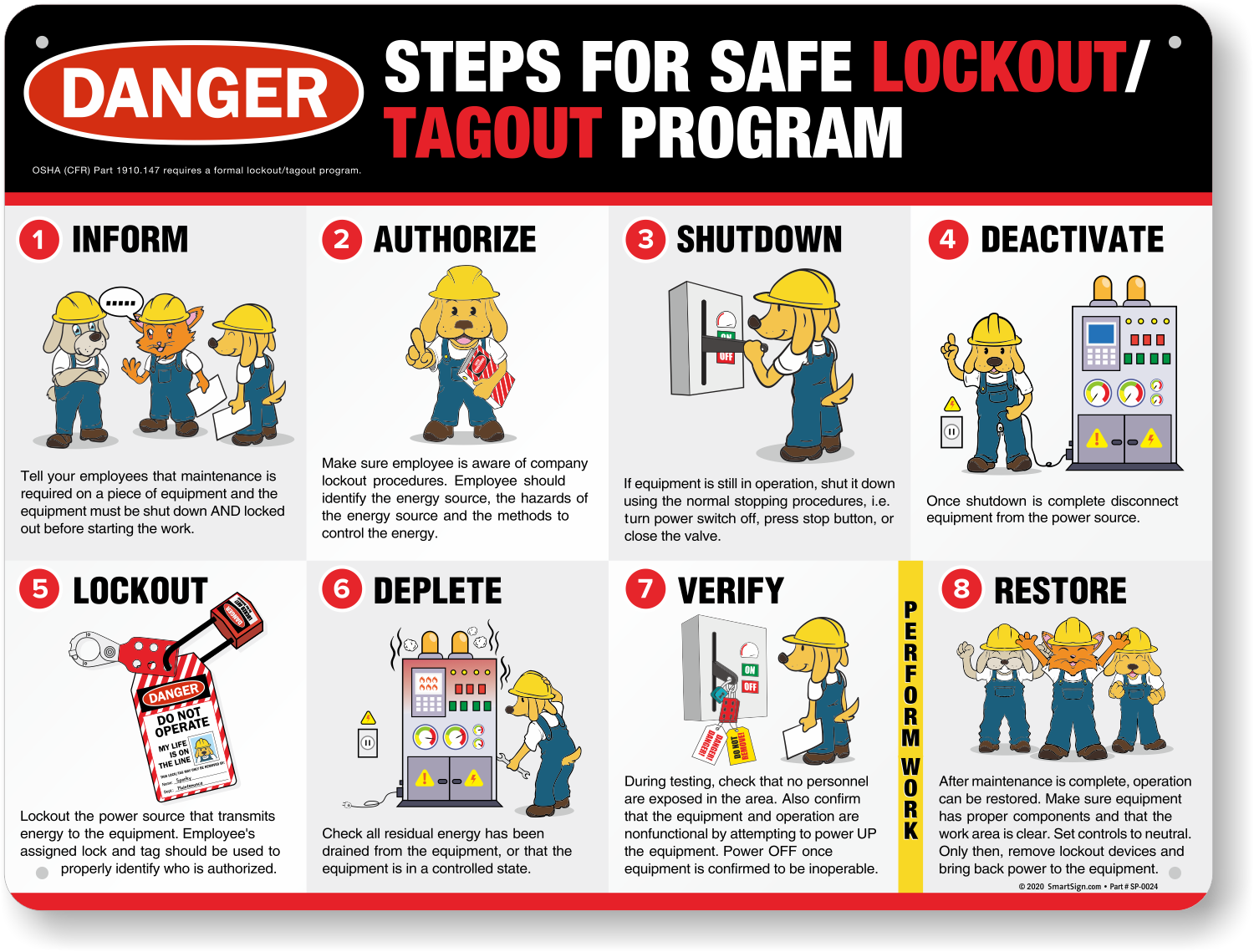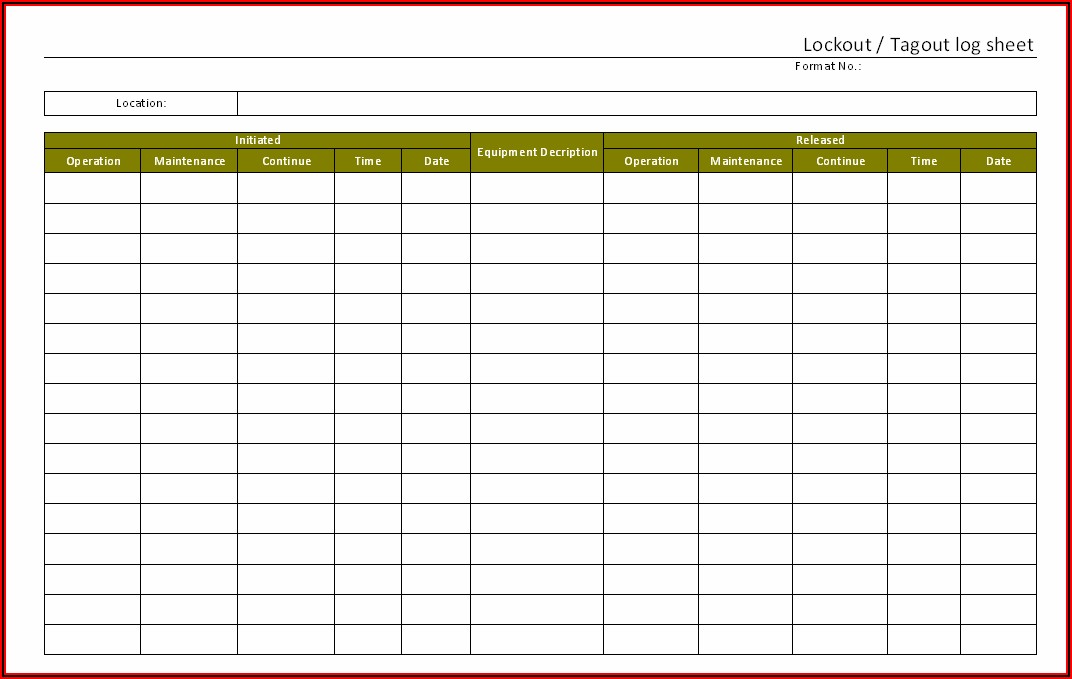
In a manufacturing plant at 3:47 a.m., a maintenance technician attempts to remove a lock from a conveyor motor without proper authorization. The line restarts unexpectedly. The result: a crushed hand and a six-figure OSHA fine. This scenario isn’t rare. Over 120 workplace fatalities annually are tied to improper lockout tagout (LOTO) procedures—many stemming from poorly managed lock removal processes. At the heart of preventing such tragedies lies a simple but vital document: the lockout tagout lock removal form.
This form isn’t just paperwork—it’s a legal and operational checkpoint designed to ensure that only authorized personnel remove energy control devices, and only after verifying that conditions are safe. Yet, too many organizations treat it as a box-ticking exercise, opening the door to confusion, injury, and regulatory penalties.
Let’s break down what a lock removal form should include, how it integrates into real-world safety workflows, and what separates a compliant process from a catastrophic failure.
Why the Lock Removal Form Is Non-Negotiable
Lockout tagout procedures don’t end when a machine is de-energized. They conclude only when every lock is safely and correctly removed. The lock removal form acts as the final verification that:
- The maintenance or servicing task is complete
- Tools have been removed
- Guards are reinstalled
- The area is clear of personnel
- Only the authorized employee (or a designated alternate under strict protocols) removes their lock
Without a standardized form, assumptions creep in. “I saw John finish the motor alignment—I’ll take his lock off.” That kind of decision accounts for nearly 23% of LOTO-related incidents, according to OSHA incident reports.
The form brings accountability. It documents who removed the lock, when, why, and under whose supervision. In an audit or accident investigation, that trail is invaluable.
Key Components of an Effective Lock Removal Form
A strong lock removal form isn’t cluttered with unnecessary fields. It’s purpose-built, clear, and enforceable. Here are the essential elements:
1. Equipment Identification Include make, model, serial number, and location. A form tied to “Machine #3” fails. One tied to “Hydraulic Press – Model HPX-2200, Line B, South Facility” passes.
2. Authorized Employee Details Name, ID, department, and signature of the person who applied and is now removing the lock. This enforces personal responsibility.
3. Removal Justification A short field explaining why the lock is being removed. Examples: - “Maintenance completed – gearbox replaced” - “Servicing finished – safety inspection passed”
This prevents blind removal based on verbal cues.
4. Verification Checklist A mini-checklist confirming:
- Work is complete
- Tools cleared
- Guards in place
- Area evacuated
- No conflicting operations
5. Supervisor Approval (When Required) For complex, multi-lock, or cross-departmental jobs, supervisor sign-off adds an extra layer of oversight.
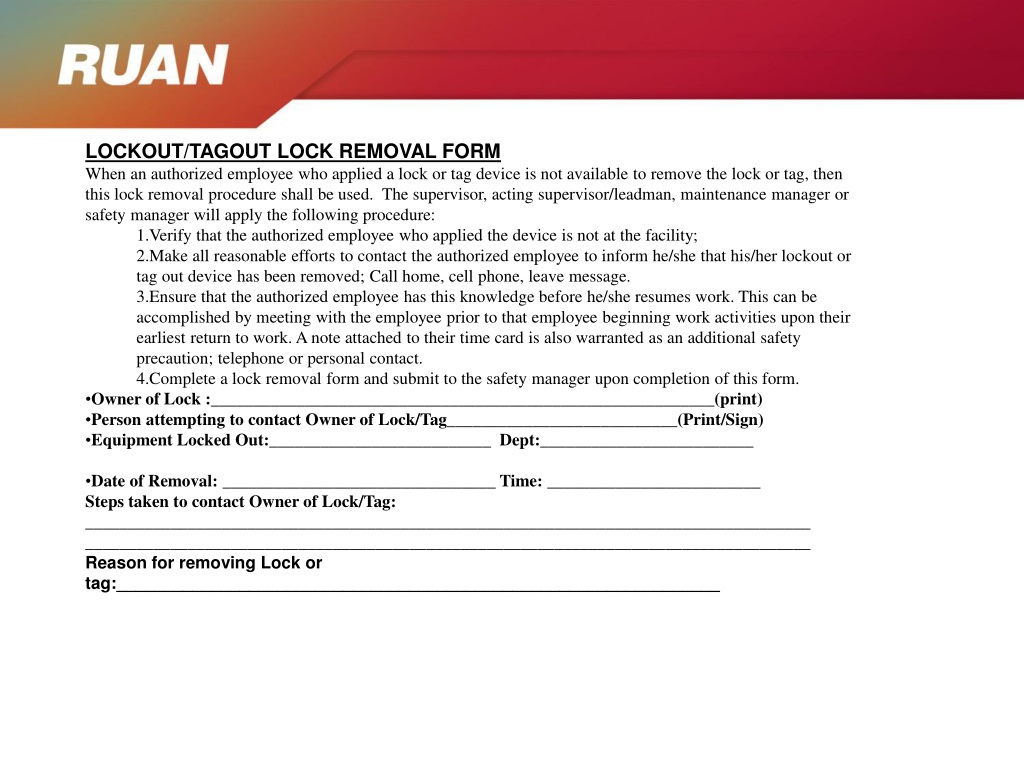
6. Timestamps Both removal time and, if applicable, the time the work began. This supports incident reconstruction and compliance logging.
7. Emergency Override Section Rare, but necessary. If a lock must be removed without the original owner present (e.g., they left early), this section requires: - Written justification - Supervisor and safety officer approval - Proof of verification that the worker is not at risk
When and How to Use the Form in Real Operations
A lock removal form isn’t used for every LOTO event—but it should be used whenever there’s risk of miscommunication, multiple parties, or extended downtime.
Example 1: Routine Maintenance A night-shift technician replaces a pump seal. They apply one lock, complete the job, verify safety, fill out the form, and remove the lock. Simple. The form logs the action for the day shift’s review.
Example 2: Group Lockout Five technicians service a production line. Each applies their own lock. When work finishes, each must sign off individually on the removal form. The form becomes a collective sign-out sheet, preventing a supervisor from removing all locks prematurely.
Example 3: Shift Changeover Day crew starts a repair but doesn’t finish. They leave their locks and tags in place. Night crew arrives, sees the tags, and does not interfere. The next morning, the original crew returns, verifies the area, signs the form, and removes their locks. The form prevents confusion over status.
Common Mistakes That Undermine the Process
Even with a well-designed form, organizations falter. Here are recurring failures:
Mistake 1: Using Generic or Homemade Forms A sticky note with “Lock removed – Jim” has zero legal standing. It lacks structure, verification, and traceability.
Mistake 2: Allowing Blank or Retroactive Signatures Backdating forms or signing before verification violates OSHA 1910.147. Every entry must be contemporaneous.
Mistake 3: Not Training on the Form’s Purpose If employees see the form as “just paperwork,” they’ll shortcut it. Training must emphasize that the form protects them—not just the company.
Mistake 4: Storing Forms Electronically Without Backup Digital logs are efficient, but if the system crashes and no physical copies exist, compliance is compromised. Always maintain redundancy.
Mistake 5: Ignoring the “Why” Field Leaving the justification blank (“N/A”) defeats the intent. Reviewers should understand the context of each removal.
Integrating the Form into Your LOTO Program
A lock removal form doesn’t stand alone. It’s part of a broader energy control program. Here’s how to embed it effectively:
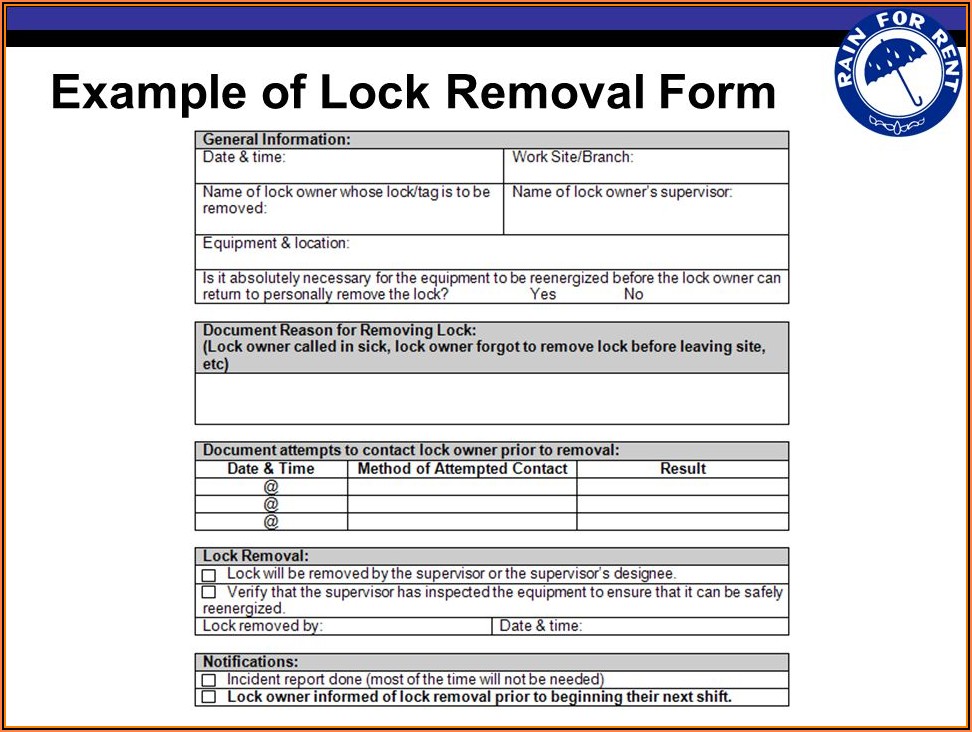
- Include it in your written LOTO procedure – Reference the form by name and location (e.g., “Section 4.3: Lock Removal Documentation”).
- Train annually and during onboarding – Use real examples of failures to show why the form matters.
- Audit its use quarterly – Sample 10–15 forms and verify completeness, accuracy, and timeliness.
- Link it to your permit-to-work system – If your plant uses PTW, the removal form should be a required closure step.
- Store forms for at least one year – OSHA may request records during inspections.
Top 5 Lockout Tagout Lock Removal Form Templates
Not all forms are created equal. These templates balance compliance, usability, and real-world practicality:
| Name | Source | Key Features | Best For |
|---|---|---|---|
| OSHA-Compliant LOTO Lock Removal Form | SafetyDocs (by SafetyCulture) | Digital and print versions, supervisor approval, emergency override section | Mid to large facilities using digital safety platforms |
| Lock Removal Authorization Checklist | Creative Safety Supply | Visual layout, integrated PPE check, multi-worker fields | Facilities with frequent group lockouts |
| LOTO Lock Removal Log Template | Vertex42 (Excel-based) | Automated timestamps, data sorting, customizable fields | Organizations preferring spreadsheet tracking |
| Energy Control Device Removal Form | J. J. Keller & Associates | OSHA-aligned, bilingual (EN/ES), audit-ready formatting | Multilingual teams and regulated environments |
| SmartForm: Lockout Removal Verification | EHS Insight | Mobile-compatible, GPS-stamped, integrates with LMS | Companies using enterprise EHS software |
Choose one that aligns with your workflow. A paper-based shop may prefer Keller’s printable version. A tech-forward plant might opt for EHS Insight’s real-time tracking.
What OSHA Expects (And Where You’re Likely Falling Short)
OSHA’s standard 29 CFR 1910.147 doesn’t explicitly mandate a “lock removal form,” but it requires: - Procedures for lock and tag removal - Verification that employees are aware before re-energizing - Documentation of authorized personnel actions
In practice, that means a removal form is the most defensible method of compliance.
Inspections often reveal these gaps: - No record of who removed a lock - Incomplete justifications - Missing verification steps - Forms not retained
Don’t wait for a citation. Audit your current process. If your team can’t produce three recent removal forms on demand, you’re at risk.
Making the Form Part of Your Safety Culture
The best lock removal forms aren’t stored in binders—they’re used without hesitation. That shift happens when safety is cultural, not just procedural.
Start by asking supervisors: “Can you show me the removal form for yesterday’s press repair?” Make it routine. Review forms in safety meetings. Celebrate teams that maintain perfect documentation.
One auto parts plant reduced LOTO incidents by 78% in 18 months—not by changing equipment, but by enforcing consistent form use and making it a KPI for maintenance leads.
Final Steps: Implementing a Reliable Process
Don’t let a preventable accident trace back to a missing signature. Take action now:
- Select or design a standardized form using the components above.
- Train every authorized employee on proper completion.
- Integrate it into shift handover protocols.
- Conduct unannounced audits of completed forms.
- Review and revise annually—especially after an incident or near-miss.
A lockout tagout lock removal form is more than a document. It’s a final safeguard—the last line of defense between a safe restart and a life-altering incident. Treat it with the gravity it deserves.
Frequently Asked Questions
What is a lockout tagout lock removal form? It’s a documented record used to verify that a lockout device is being removed safely, only after maintenance is complete and conditions are secure.
Who can remove a lock from a LOTO procedure? Only the authorized employee who applied the lock, unless an emergency removal protocol is followed with proper verification and approvals.
Do I need a form for every lock removed? Best practice says yes, especially in high-risk or multi-person environments. It ensures accountability and traceability.
Can digital forms be used for LOTO lock removal? Yes, if they are secure, timestamped, and accessible for audits. Many safety platforms now offer mobile-compatible versions.
What happens if a lock is removed without a form? This violates safety protocol and OSHA guidelines. It can lead to equipment damage, injury, and citations during inspections.
Should the form include photos or diagrams? Not required, but helpful. A photo of the reassembled machine or tagged energy points adds clarity during audits.
How long should lock removal forms be kept? At minimum, one year. Some industries or internal policies may require longer retention.
FAQ
What should you look for in Lockout Tagout Lock Removal Form Best Practices? Focus on relevance, practical value, and how well the solution matches real user intent.
Is Lockout Tagout Lock Removal Form Best Practices suitable for beginners? That depends on the workflow, but a clear step-by-step approach usually makes it easier to start.
How do you compare options around Lockout Tagout Lock Removal Form Best Practices? Compare features, trust signals, limitations, pricing, and ease of implementation.
What mistakes should you avoid? Avoid generic choices, weak validation, and decisions based only on marketing claims.
What is the next best step? Shortlist the most relevant options, validate them quickly, and refine from real-world results.